Let’s talk quiz makers.
There exist many products on the market that charge a monthly fee for uploading lecture slides into what is often little more than a GPT or Claude wrapper, all to create some multiple-choice or multi-select quizzes.
A few problems arise with this approach. Firstly, paying for a subscription-based service that covers only a single context in my life (i.e. studying) is not very prudent in my opinion. Secondly, I don’t think my projected volume of quiz maker use can justify these services’ monthly cost. Lastly, they encourage workflows that, while touted as efficient or helpful, are ultimately alien to me, which adds the friction of tailoring my own productivity workflow to that which the service demands (like generating flashcards by other proprietors).
It is the latter two factors that prompted me to work on this project.
Back to Basics
My workflow is simple.
- Before class, summarise the lecture slides and note down any points of confusion I’d like to have clarified.
- During class, note down what the professor/lecturer has to say that is not explicitly mentioned in the slides and clarify any doubts if needed.
- After class (maybe a day or two later), clean up these raw notes into topic-based notes in Obsidian.
- Quiz myself based on my notes a few days later.
This is done on a weekly per-class basis. Each weekly topic is subject to this workflow, which hopefully can bring about the benefits of the much-espoused active recall and spaced repetition (since these take place over several days, rather than one afternoon).
The key stumbling block here, however, is step 4. Do I have to quiz myself flashcard-style? That would require creating the flashcards myself, requiring hours of copy-pasting my notes or, worse still, paying for some service.
How do I make my quizzes playable like how my university’s learning system, or how quiz sites like Kahoot or Wooclap do it? The problem here is that I also have to manually author questions and multiple-choice answers to them, and Kahoot’s and Wooclap’s intended purpose leans towards live, instructor-led sessions rather than reusable, self-paced quizzes.
Pasting my notes into ChatGPT and copying the JSON-formatted output I had to explicitly specify into my existing quiz maker/player doesn’t make for an exciting use of my time, effort and clicks, either.
This setback, however, presented an opportunity for me to automate much of the process that takes place between steps 3 and 4 of my workflow.
Architecture
My quiz generator uses a slightly different tech stack from my publicly available quiz maker and player. It features a Flask-based backend with a single API endpoint responsible for processing Markdown input via an OpenAI GPT-5 mini call. The service is currently deployed locally using Docker via OrbStack for development and testing.
Quiz Generation and Prompting
I’ve decided to insert the quiz generation after the note-taking step of my workflow, as I’ve found through free trials of other products and services that uploading my slides directly not only distances me from actually absorbing and understanding my lecture notes as they are, but attempting to replicate this feature like for like in my own implementation proved a challenge in prompt engineering that was more trouble than was worth (in previous iterations, I had to get the model to ignore announcement slides, learning objectives, tables of contents, and more).
An early version of the prompt is as follows:
You are an AI Quiz Generator.

Task:
- Read the following markdown content.
- Generate {total_questions} questions:
    - {mcq_count} multiple choice questions (single correct answer)
    - {multi_select_count} multi-select questions (multiple correct answers)

Rules:
1. Use this exact JSON schema for each question:
{{ "question": "question text", "options": ["option1", "option2", "option3", "option4"], "correct": 0, "explanation": "reasoning behind the answer" }}
2. Zero-index all options.
3. Include only content-based questions. Do not hallucinate information.
4. Each question must have exactly 4 options.
5. Output must be valid JSON, no extra text, no comments.
6. Multi-select questions must have 2 or more correct options.

Markdown content:
\"\"\"{markdown_content}\"\"\"
This prompt gave me a fairly good approximation of how multiple-choice and multi-select quiz questions are tested at my university while providing a JSON output compatible with my quiz player. I have since made some further changes to the prompt, mostly tweaking the rules to my preferences.
Closing Thoughts
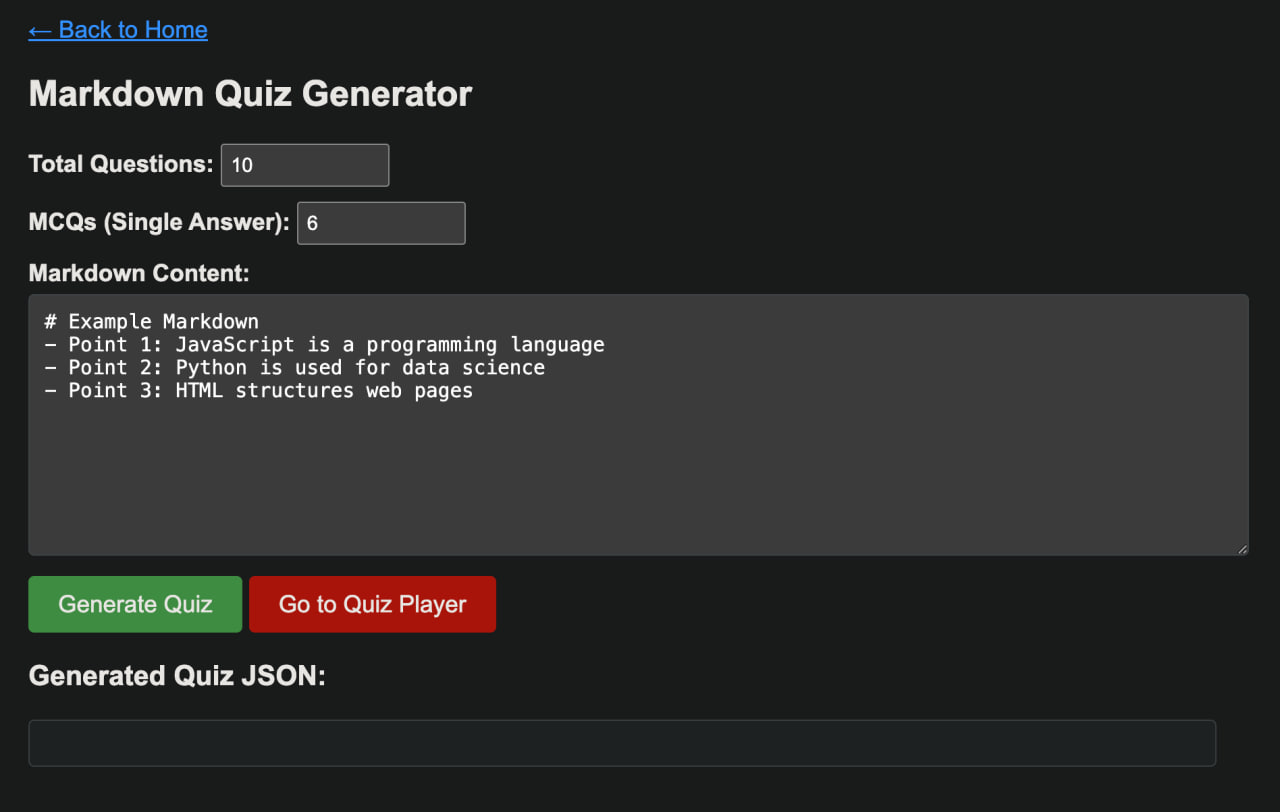
Ultimately, the goal of this project is not to replace existing learning platforms, but to support a workflow that already works for me. Automating the step between note-taking and self-testing reduces friction without distancing me from the material, which was the original motivation behind building it in the first place.